10 AI Side Hustles You Can Start With $0 in 2025

Look, I’m not going to waste your time with fluff. The world of making money has completely changed, and if you’re not paying attention to AI, you’re missing out on some seriously accessible opportunities. I’ve spent months researching how people are actually making money with AI tools—not the hype, but the real deal.
Here’s what surprised me: you don’t need to be a tech genius or have a bunch of money sitting around. Most of the powerful AI tools out there have generous free tiers. ChatGPT, Claude, Google Gemini—they’re all accessible without spending a cent. And people are building legitimate businesses around them.
Whether you’re between jobs, working full-time and need extra cash, or just curious about what’s possible, I’m breaking down ten side hustles that real people are doing right now. No theory, no BS—just practical ways to make money.
Quick note on the tools I’ll mention: ChatGPT is probably the most versatile, Claude writes really naturally (great for content), and Google Gemini is solid for research. Most have free versions that’ll get you started. There’s also Canva for design, Leonardo.ai for images, and a bunch of others I’ll mention as we go.
Alright, let’s get into it.
1. Writing Content for Businesses
Every company needs content. Blog posts, product descriptions, website copy, email newsletters—it’s endless. And most businesses either don’t have time to write it themselves or they’re not great at it.

Here’s where it gets interesting: AI can knock out a solid first draft in minutes. But—and this is huge—you can’t just copy-paste that stuff. Clients can tell, and honestly, it’s usually not that good on its own. Your job is to use AI as your research assistant and rough draft writer, then make it actually good.
I’d start with ChatGPT or Claude (both have free versions). Spend a week just playing around with them. Write some sample blog posts in a niche you know something about—tech, fitness, personal finance, whatever. Put these on Medium or LinkedIn to show potential clients.
Then hit up Upwork or Fiverr. Yeah, the competition’s rough at first, but if you can show you deliver quality on time, you’ll get repeat clients fast. Start at maybe $50-75 per article while you’re building your reputation. Once you’ve got 10-15 happy clients and some testimonials, bump your rates up. People charging $200-300 per article aren’t necessarily better writers—they just marketed themselves better and built trust.
One thing I wish someone had told me earlier: pick a niche. “I write about everything” sounds flexible, but “I write about SaaS marketing” or “I specialize in health and wellness content” gets you hired faster and lets you charge more.
The actual writing process? Use AI to research the topic, outline the piece, maybe draft sections. Then you rewrite it in your own voice, add examples, fact-check everything, and make sure it doesn’t sound like a robot wrote it. Usually takes me about 2-3 hours per article once you get the hang of it.
What you’ll need (all free):
- ChatGPT or Claude
- Grammarly’s free version for catching typos
- Google Docs
- Hemingway Editor (helps keep your writing clear)
Realistic money: When you’re starting out, maybe $20-100 per piece. After a few months and some good reviews, you can easily hit $100-500 per article. Some writers I know are pulling in $2,000-3,000 a month doing this part-time.
2. Managing Social Media for Small Businesses
Most small businesses know they should be on social media. Most of them also suck at it because they’re too busy actually running their business. That’s your opportunity.

I’m talking about managing Twitter/X accounts, writing Instagram captions, creating LinkedIn posts, planning content calendars—basically being their voice online. And with AI, you can manage multiple clients without losing your mind.
Twitter’s probably the easiest place to start because it’s just text, moves fast, and businesses see real ROI from it. Study accounts that are crushing it in different industries. Notice patterns in what performs well. Then use AI to help you generate ideas and draft posts, but—and I can’t stress this enough—always add personality. Nobody wants to follow a brand that sounds like a corporate robot.
Your portfolio is literally just your own social media. If you can grow a Twitter account to a few hundred engaged followers, that’s proof you know what you’re doing. Share screenshots of good engagement, talk about your process, and local businesses will start noticing.
Here’s a pricing tip that helped me: don’t charge by the hour. Offer packages. Something like $500/month for 15 posts, engagement monitoring, and monthly analytics. $1,000/month for daily posting, community management, and strategy calls. Businesses understand packages better than hourly rates, and you make more money.
Start by reaching out to businesses in your area that have weak social media presence. Coffee shops, fitness studios, local service providers. They usually have budget for marketing but no clue how to use social media effectively.
Tools you’ll use:
- ChatGPT for content ideas and drafting
- Canva’s free version for graphics (their AI features are surprisingly good)
- Buffer or Later for scheduling (free plans work fine when starting)
- Just Google Sheets for planning honestly
Money-wise: If you’re managing 3-4 clients at $500-800 each, that’s $1,500-3,200 per month. Not bad for something you can do in a few hours a day.
3. Selling Digital Products on Etsy
This one’s pretty wild. People are making serious money selling digital downloads—planners, templates, printable art, coloring books—stuff that customers download instantly. No shipping, no inventory, no hassle. Pure profit after Etsy’s small fees.
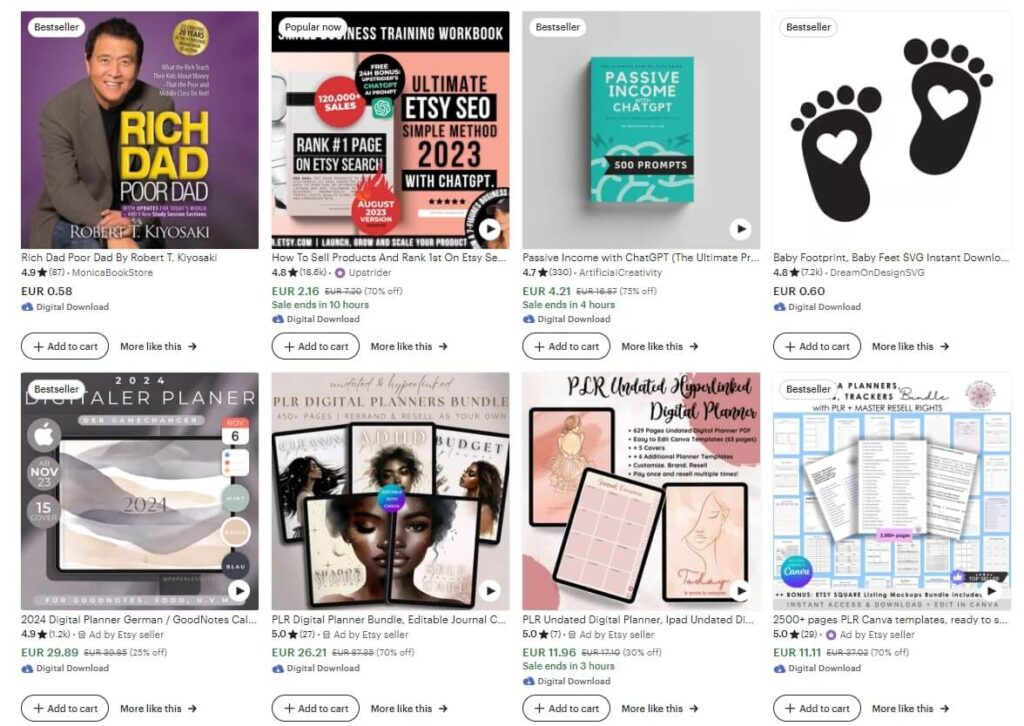
The key is finding a micro-niche. Don’t make generic “2025 planner”—make “Meal prep planner for busy moms with picky eaters” or “Budget tracker for freelance designers.” Specific sells.
I’ve seen people crush it with wedding planning templates, social media templates for small businesses, printable wall art with niche quotes, even teacher resources. Digital planners especially do well because people can reuse them on their tablets.
Making these is surprisingly easy with Canva’s free version. The AI features can help you generate ideas for what to create and even help with design elements. Let’s say you want to make a fitness journal—ask ChatGPT what pages it should include, what tracking elements people want, color schemes that appeal to your target audience. Then build it in Canva.
The real work is researching what’s already selling. Use eRank (free version) to see what keywords are hot on Etsy. Look at bestsellers in your category. Notice what they’re pricing at, how they’re photographing their digital products, what their descriptions emphasize.
Upload your first product, optimize it with good keywords and photos, then create variations. If you made a meal planner, make a weekly version, a monthly version, a version for specific diets. More products = more chances to be found = more sales.
Pinterest is your best friend for free traffic. Create pins for your products, and Pinterest will send people directly to your Etsy shop. Instagram works too if you’re targeting the right audience.
What you need:
- Canva (free account)
- ChatGPT for product ideas
- Etsy shop (free to open, small listing fees)
- Maybe Leonardo.ai or another AI art tool if you’re making printable art
Income potential: Starting out, maybe $100-200/month. But once you’ve got 20-30 products and your shop is established, $1,000-5,000 monthly is realistic. Some people are doing way more than that.
4. Writing Resumes and Cover Letters
Job seekers are desperate for good resumes. They know their current one isn’t cutting it, but they don’t know how to fix it. That’s money in your pocket if you can help them.
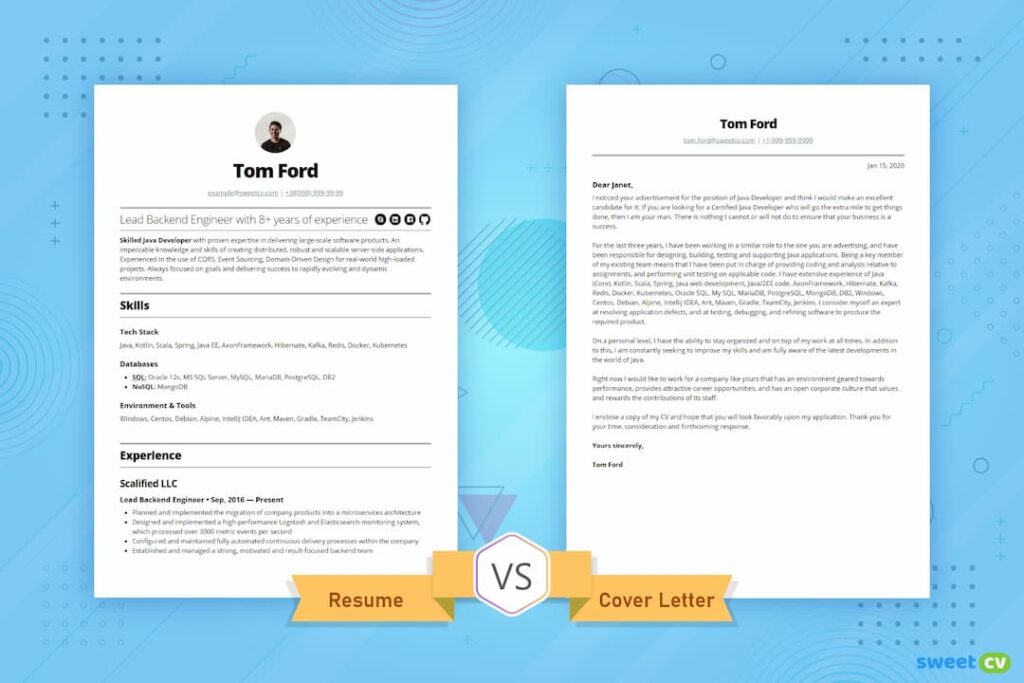
The resume industry is huge because everyone needs one at some point, and most people write terrible resumes. They list job duties instead of achievements, use boring language, and don’t optimize for ATS (those systems companies use to filter applications). You can fix all that with AI’s help.
Here’s how it works: someone sends you their old resume and the job they’re applying for. You use ChatGPT or Claude to transform their boring bullet points into achievement-focused ones with metrics. “Managed social media” becomes “Grew Instagram following by 240% in 6 months, resulting in 15% increase in web traffic.” AI’s great at that transformation once you give it the right prompt.
But you need to understand resume best practices first. Spend a few days learning about ATS optimization, what makes a good resume structure, industry-specific expectations. There are tons of free resources on YouTube. Then practice rewriting resumes for friends or family before you charge for it.
Pricing: Start around $75-100 for a basic resume rewrite. Add another $30-50 for a cover letter. LinkedIn optimization is another $40-60. Once you’ve done 20-30 resumes and have solid testimonials, raise your rates. $150-200 for a resume is totally reasonable, and people who need career-change resumes or executive-level work will pay $250-400 easily.
Fiverr and Upwork are obvious places to start, but LinkedIn works great too. Post tips about resume writing, share before-and-after examples (with permission), and message people directly who mention job hunting in their posts.
Tools:
- ChatGPT or Claude
- Canva for professional resume templates
- Grammarly to catch mistakes
- Google Docs for delivery
Money: Figure $50-300 per resume depending on complexity. If you’re doing 2-3 per day, that’s potentially $3,000-6,000 per month part-time. Not life-changing, but pretty solid for a few hours of work.
5. Running a Faceless YouTube Channel
YouTube’s algorithm doesn’t care if you’re on camera or not. Some of the biggest channels never show a face. Think about it—all those meditation channels, top 10 lists, educational explainers, finance breakdowns. Just voiceover and visuals.

This is perfect if you’re camera-shy or just don’t want to deal with filming yourself. The work happens in scripting, voiceover, and editing. And AI makes all of that way faster.
Pick a niche where faceless content makes sense. Finance tips, interesting facts, book summaries, historical events, productivity hacks, meditation and sleep sounds—loads of options. The key is picking something you can make consistently. Don’t choose a topic that’ll bore you after five videos.
Your workflow: Use ChatGPT to help research and script videos. Keep scripts tight—YouTube viewers have short attention spans. Then either use your own voice (honestly, a decent microphone and some practice works fine) or use AI voice generators like ElevenLabs. Their free tier gives you limited credits, which is enough to test if this works for you.
For visuals, combine stock footage from Pexels or Pixabay (totally free) with simple graphics from Canva. Edit everything in DaVinci Resolve—it’s free and way more powerful than you’d expect. Or use CapCut if you want something simpler.
The hard part isn’t making videos. It’s making videos people actually want to watch. Study your competition. What thumbnails get clicks? What titles perform? What’s their video structure? Copy what works (not literally, but learn from them).
Money comes from ads once you hit 1,000 subscribers and 4,000 watch hours. That typically takes 4-6 months of consistent posting (2-3 videos per week). But you can also add affiliate links in descriptions, promote digital products, or get sponsors once you’re bigger.
You’ll need:
- ChatGPT for scripts
- ElevenLabs or your own voice
- Canva for thumbnails
- Free stock footage sites
- DaVinci Resolve or CapCut for editing
Realistic income: Nothing for the first few months while you build. Then maybe $100-500/month from ads. Bigger channels with 50k+ subscribers can make $2,000-10,000+ monthly, but that takes time and consistency.
6. Being a Virtual Assistant (But Better)
Virtual assistants are everywhere now, but most of them are just doing basic admin work. You can stand out by being the VA who uses AI to do twice as much in half the time.

The job is helping busy people or business owners with tasks they don’t have time for. Email management, scheduling, basic research, data entry, customer support, even light bookkeeping. Nothing crazy complicated, but stuff that eats up their day.
Where AI comes in: Instead of manually researching something for an hour, you use ChatGPT to compile information in 10 minutes and then verify it. Instead of writing each email from scratch, you feed AI the context and let it draft responses that you personalize. You’re not replacing your skills—you’re augmenting them.
This lets you charge more because you’re faster and more capable than traditional VAs. Someone billing $15/hour doing basic admin work makes way less than you billing $30-40/hour delivering faster, better results.
To start, pick 2-3 services you’re already decent at. Maybe you’re organized, so scheduling and inbox management are natural. Or you’re good with research and data. Build your pitch around those strengths plus your AI efficiency.
Sign up for platforms like Belay or Time Etc, but honestly, direct outreach works better. Find solopreneurs or small business owners on Twitter, LinkedIn, or in Facebook groups. They’re usually drowning in admin work and happy to pay someone to take it off their plate.
Start with maybe 2-3 clients working 5-10 hours a week each. That’s manageable while keeping your day job or doing other things. Once you’ve proven yourself, raise rates and add more clients. Some VAs I know are making $4,000-6,000 monthly working 20-30 hours a week.
Tools you’ll use:
- ChatGPT for drafting, research, data work
- Google Workspace
- Zoom for meetings
- Calendly for scheduling
- Notion or Trello for organization
Money: Starting rate might be $20-25/hour. After a few months with solid reviews, $35-50/hour is normal. At 20 hours per week, that’s $1,400-2,000 monthly.
7. Print-on-Demand with AI Designs
This one’s pretty passive once you set it up. You upload designs to platforms like Redbubble or Zazzle, and when someone buys a product with your design, they print it and ship it. You get a cut, no inventory needed, zero upfront cost.

People buy t-shirts, mugs, phone cases, posters, stickers—all with custom designs. The trick is making designs people actually want to buy. And with AI art generators, you don’t need to be a designer to create good stuff.
Niches work better than generic designs. Instead of “Coffee Lover,” think “Nurse Life with Coffee” or “Software Developer Caffeine Dependency.” Get specific. Dog owners who have golden retrievers. Teachers who teach 3rd grade. Nurses who work night shifts. Gamers who play specific games.
Use Leonardo.ai or Ideogram.ai (both have free tiers) to generate designs. You can also combine AI art with text in Canva. The key is making designs that look cohesive and professional, not just random AI images slapped on a shirt.
Upload the same design to multiple platforms—Redbubble, TeePublic, Society6, Printful connected to Etsy. More platforms = more potential sales. Then optimize your product titles and tags with relevant keywords so people can find them.
Marketing is mostly Pinterest and Instagram. Create pins showing your designs on products, use relevant hashtags, and let Pinterest’s algorithm do the work. It’s not overnight money, but it builds over time.
The real strategy is volume. One design might make $10 a month. Fifty designs might make $500 a month. People who are serious about this have hundreds of designs and make thousands monthly, but that takes months of consistent uploading.
What you need:
- AI art generator (Leonardo.ai, Ideogram.ai, etc.)
- Canva for adding text and refinements
- Free accounts on POD platforms
- ChatGPT for niche research
Income: First month, probably $0-20. After 50-100 designs and a few months, maybe $200-500. Scale to hundreds of designs and you’re looking at $1,000-3,000+ monthly. It compounds if you keep adding designs.
8. Translation and Localization Services
If you speak two languages—even if you’re not perfectly fluent—this could be your easiest entry point. AI translation has gotten scary good, but businesses still need humans to make sure translations sound natural and culturally appropriate.

The workflow is simple: AI does the heavy lifting of translating, you refine it to sound natural. You’re not translating word-for-word anymore. You’re making sure the meaning and tone are right, idioms make sense, and it doesn’t sound like a robot wrote it in the target language.
This is especially valuable for business content. Marketing materials, website copy, product descriptions, social media posts—these need to resonate with people, not just be technically accurate. A straight machine translation of “hit it out of the park” into Spanish might translate the words correctly but lose the meaning. You fix that.
You don’t need to be a certified translator for most freelance work. If you grew up bilingual or studied a language seriously, that’s usually enough for business content. Legal and medical translation is different—that needs certification—but there’s tons of work in e-commerce and marketing.
Charge per word, not per hour. Industry standard is anywhere from $0.05 to $0.25 per word depending on language pair and content type. A 500-word document at $0.10/word is $50 for maybe 30-40 minutes of work once you’re efficient.
Find clients on Upwork, Fiverr, or reach out directly to businesses expanding internationally. E-commerce brands selling on Amazon in multiple countries need constant translation work.
Tools:
- ChatGPT, Claude, or DeepL for base translation
- Google Docs for working
- Any dictionaries or glossaries for technical terms
Income potential: At $0.08-0.12 per word, translating 3,000-5,000 words weekly is $240-600. That’s maybe 10-15 hours of work if you’re efficient. Scale up and you’re looking at $1,500-2,500 monthly.
9. Creating and Selling Online Courses
If you know something that other people want to learn, you can package that into a course and sell it. And AI makes the creation process way less daunting.

People buy courses on everything. Excel skills, photography basics, time management, how to start a podcast, personal finance, even niche stuff like “how to negotiate with contractors” or “meal planning for a family of five.” If someone’s searching YouTube for it, there’s probably a market for a structured course.
Here’s the thing about courses: you don’t need to be the world’s leading expert. You just need to know more than your target audience and be able to explain it clearly. Teaching Excel to beginners? You don’t need to be an Excel guru, you just need to understand it better than someone who’s never used it.
Use AI to outline your course structure. Ask ChatGPT something like “Create a complete course outline for teaching time management to busy professionals, with 6 modules and lessons for each.” Then refine based on your knowledge.
For each lesson, have AI draft scripts, generate quiz questions, create cheat sheets. You record the actual lessons (screen recording or talking head, whatever works), then use Canva to make any slides or graphics.
Host it on YouTube (free but hard to monetize directly), Skillshare (revenue share model), or Teachable’s free tier. Gumroad works too if you want to sell it directly.
The money is inconsistent at first. You might sell nothing for weeks, then suddenly get five sales in a day. But courses are somewhat passive—once it’s made, you can sell it forever with minimal updates.
What you’ll need:
- ChatGPT for planning and scripts
- Free screen recording (OBS Studio or Zoom)
- Canva for materials
- Hosting platform (YouTube, Skillshare, or Teachable)
Income: Really varies. Some courses make $100 total. Others make $1,000+ monthly. Depends on topic, quality, and how well you market it. But even a modest course generating $300-500 per month is solid passive income.
10. Selling AI-Generated Images as Stock Photography
This is probably the most controversial one on the list, but platforms like Adobe Stock and Shutterstock are accepting AI-generated images (with proper disclosure). If you can create images that look professional and meet commercial needs, there’s money here.

Businesses need stock photos constantly. Website headers, blog post images, social media graphics, presentations—they’re buying these images every single day. And while there are millions of stock photos out there, specific concepts are still hard to find or expensive.
The key is understanding what sells. Generic landscape photos? Nah, the market’s saturated. But specific business concepts, diverse people in realistic situations, abstract backgrounds for presentations, technology concepts—these do well.
Use Leonardo.ai, Ideogram.ai, or similar tools to generate images. Spend time learning to write good prompts that create commercial-quality results. You want images that look natural and professional, not obviously AI-generated with weird hands or distorted faces.
Create variations of concepts that work. If you made a good image of “diverse team collaborating in modern office,” make five more versions with different people, angles, moods. More uploads = more potential sales.
The income is purely passive but builds slowly. You might upload 50 images and make $2 the first month. But as your portfolio grows to 200, 500, 1,000+ images, those small sales add up. People with large portfolios report making $500-2,000 monthly purely from downloads.
Upload to multiple platforms: Adobe Stock, Shutterstock, Etsy for digital downloads, even your own website through Gumroad. Just make sure you’re following each platform’s AI disclosure rules.
Tools you need:
- AI image generator with free tier
- GIMP if you need any editing
- Maybe Upscayl for enhancing image quality
- ChatGPT for keyword research
Money: Very slow start. Maybe $10-50 in the first few months. But with 100+ images and consistent uploads, $200-1,000 monthly is realistic. It’s genuinely passive once uploaded though.
What Actually Makes These Work
Here’s what I learned talking to people who are successfully doing this stuff: they all made the same mistakes at first, and they all figured out the same solutions.
Don’t Try Everything at Once
This is the biggest trap. You read about ten different opportunities and want to start all of them tomorrow. Then you’re stressed, spreading yourself thin, and not doing anything well. Pick one. Just one. Give it 30-60 days of real effort before even thinking about adding another.
How do you choose? Think about what you’re already decent at or what sounds interesting enough that you won’t quit after two weeks. If you hate writing, content writing probably isn’t for you no matter how profitable it is. If you’re organized and like helping people, virtual assistant work might click.
Learn Your Tools Inside and Out
Spending a week just messing around with ChatGPT or Claude isn’t wasted time—it’s an investment. Try different prompts. See what works and what doesn’t. Join Reddit communities or Discord servers where people share tips.
The difference between someone making $200/month and $2,000/month with the same side hustle often isn’t talent. It’s that they learned to use their tools more effectively.
Get Testimonials Fast
Nobody wants to be your first client. That’s why your first few jobs should be priced low or even done for free in exchange for a detailed testimonial. Once you have 3-5 glowing reviews, getting clients becomes exponentially easier.
Screenshot those testimonials. Put them on your profile. Share them on social media. They’re gold.
Price Based on Value, Not Time
When you’re starting out, you’ll probably charge lower rates to get experience. That’s fine. But don’t stay there forever. As soon as you have proof you deliver results, raise your rates.
Here’s a trick: create tiers. Basic package at $X, standard at $Y (most people buy this one), premium at $Z. People perceive the middle option as the “smart choice” and it’s usually significantly more than your basic.
Stay Current Because AI Moves Fast
A tool that’s amazing today might be obsolete in six months, or it might add features that completely change how you work. Set aside time each week to test new tools or learn about updates to existing ones.
Follow AI news, join communities, watch YouTube tutorials. The people making the most money are the ones who adapt fastest to new capabilities.
The Mistakes Everyone Makes
Trusting AI Too Much: AI is wrong sometimes. It makes up facts, gives outdated information, and occasionally produces nonsense that sounds confident. Always fact-check. Always edit. Always add your own knowledge.
Bad Communication: You can be the best at what you do, but if clients don’t know what’s happening, they’ll be unsatisfied. Set clear expectations, give updates, ask questions before you start. Communicate more than you think necessary.
Ignoring the Legal Stuff: Different platforms have different rules about AI content. YouTube’s fine with AI videos if disclosed. Some stock photo sites have specific requirements. Etsy has policies. Read the terms of service. Follow them. Getting banned from a platform you’ve spent months building on sucks.
Giving Up Too Soon: It’s not an overnight thing. First month might make you $50. Second month maybe $200. Fourth month could be $800. But if you quit after month one because you “only” made $50, you never see month four.
Set realistic expectations. This is building a business, not buying a lottery ticket.
If You Want to Take This Further
Most people are happy making an extra $500-2,000 per month from a side hustle. That’s solid supplemental income without much stress. But some of you will want to scale this bigger—maybe even replace your full-time income.
Going Full-Time (If That’s Your Goal)
Before you quit your job to do this full-time, you need a few things in place:
Your side hustle should be making enough to cover your expenses plus a decent buffer. Most financial people recommend having 6-12 months of expenses saved up before making the jump. That cushion keeps you from panicking if you have a slow month.
You also need systems. If you’re manually doing everything, you’ll hit a ceiling fast. Start building repeatable processes, templates, automation where possible. The goal is to be able to serve more clients without working proportionally more hours.
Multiple income streams help too. Don’t rely on one client or one platform. If you’re doing content writing, also sell digital products. If you’re managing social media, offer consulting calls. Diversification protects you.
Growing Without Burning Out
There are basically two ways to grow: offer more services to adjacent markets, or go deeper with higher-paying clients in your existing market.
Going wider means if you write blog posts, you add email newsletters and case studies. Or if you manage Twitter accounts, you add Instagram and LinkedIn. You’re leveraging skills you already have.
Going deeper means you stop working with small businesses paying $500/month and start working with mid-size companies paying $2,000-5,000/month. You raise your rates significantly and deliver premium service to fewer clients.
Both work. It depends on your personality and goals.
Actually Automating Things
Everyone talks about automation, but what does that actually mean? It’s stuff like:
Setting up Calendly so clients book calls without emailing back and forth. Using Gmail templates or canned responses for common questions. Creating forms that collect all the information you need upfront so you’re not asking follow-ups. Scheduling social media posts in advance. Using project management tools so everything’s organized in one place instead of scattered across email threads.
Even small automations save hours every week, which you can spend on higher-value work or just, you know, living your life.
Tools that help with this (most have free tiers):
- Calendly for scheduling
- Zapier for connecting different apps
- Notion or Trello for project management
- Gmail templates
- Whatever scheduling tools your platform uses
Real Talk Before You Start
I’m not going to lie to you—this isn’t a “get rich quick” thing. Your first month might make you $20. Maybe $100 if you hustle hard. That can feel discouraging when you see people online claiming they made $10,000 their first week (they’re usually lying or leaving out important context).
But here’s what’s real: people are making legitimate money with these methods. Not everyone, not overnight, but consistently. I’ve talked to people pulling in an extra $500-1,500 monthly within 3-4 months of starting. That’s not life-changing money for most people, but it’s a car payment, groceries, debt payoff, or savings.
Some scale bigger. I know a few people who replaced their full-time income within a year. They treated it like a real business, not a casual hobby. They put in hours, dealt with rejection, learned from mistakes, adapted when things didn’t work.
Your First Two Weeks
Pick one thing from this list. Just one. Read everything you can about it for 2-3 days. Watch YouTube videos of people doing it. Join relevant Reddit communities or Facebook groups.
Then create your first sample or set up your first account. Content writer? Write three sample articles. Virtual assistant? Set up your service packages and pricing. Digital products? Make your first five products.
You’ll feel like you have no idea what you’re doing. That’s normal. Everyone feels that way at first.
Weeks 3-6
Start reaching out to potential clients or uploading products for sale. Get your first client or first sale, even if you have to lower your price to make it happen. You need that experience and that testimonial.
Do great work. Ask for a review. Use that review to get the next client.
Months 2-3
By now you should have a few clients or consistent sales. You’re learning what works and what doesn’t. You’re getting faster and better at your process. Start raising your rates slightly if you’re doing client work.
Months 4-6
This is where it either clicks or you realize it’s not for you. If it’s clicking, you should be making $500-1,500 monthly. You’ve figured out your workflow, you know your tools well, you have happy clients or steady sales.
Now you can think about scaling, adding services, or trying a second income stream.
The Honest Truth
Some of these will work better for you than others based on your personality, skills, and interests. Content writing might be perfect for someone who loves writing but terrible for someone who hates it. Social media management is great for naturally outgoing people but draining for introverts.
You won’t know until you try. And trying means actually doing it for more than two weeks.
The AI landscape is changing fast. Tools get better, new opportunities emerge, some things that work now might not work in a year. But the underlying skill—using AI to deliver value to people who need it—that’s going to be relevant for a long time.
So pick something. Start today, not Monday. Not next month. Today. Set up an account. Write a sample. Make your first product. Just start.
Questions People Always Ask
“Do I really need zero money to start?”
Yeah. Everything mentioned uses free tools or platforms with no upfront costs. You need a computer and internet, but if you’re reading this, you already have those.
“What if I’m not tech-savvy?”
These tools are designed for regular people. If you can use Google and send emails, you can use ChatGPT. If you can make a PowerPoint, you can use Canva. There’s a learning curve, but it’s not steep.
“How long until I make money?”
Depends on what you pick and how much time you put in. Client-based work (writing, VA services, social media) can get you paid within 1-2 weeks if you hustle. Product-based stuff (Etsy, print-on-demand, courses) usually takes 1-3 months to see consistent sales.
“Is using AI to make money ethical?”
If you’re delivering value, being honest about your process when required, and not just scamming people with pure AI output, yeah, it’s fine. Think of AI as your tool, not your replacement. You’re still the one with judgment, quality control, and customer service.
“Will AI detection tools catch me?”
Detection tools aren’t perfect and they’re getting less reliable as AI improves. But more importantly: if you’re editing AI content properly, adding your knowledge and voice, and making it genuinely valuable, it shouldn’t matter. Focus on quality, not trying to game detection systems.
“Which side hustle is best for beginners?”
Content writing or virtual assistant work have the lowest barriers. Print-on-demand is good if you’re more visual. Social media management works if you already spend time on those platforms. Pick what matches your current skills.
“Should I do multiple side hustles at once?”
No. Start with one until you’re making consistent money and have systems in place. Then maybe add a second. Trying to do five things at once means you’ll do all five poorly.
“What if platforms ban AI content?”
Most platforms are creating policies around AI, not banning it entirely. Stay informed, follow guidelines, always add genuine human value, and diversify so you’re not dependent on one platform.
Helpful Links to Get Started
Free AI Tools:
- ChatGPT: openai.com/chatgpt
- Claude: claude.ai
- Google Gemini: gemini.google.com
- Leonardo.ai: leonardo.ai
- Canva: canva.com
Where to Find Clients:
- Upwork.com
- Fiverr.com
- Freelancer.com
- Your local business Facebook groups
- LinkedIn (just start posting and DMing)
Learning:
- YouTube is your friend. Search “[tool name] tutorial” or “[side hustle] how to start”
- Reddit: r/sidehustle, r/freelance, r/entrepreneur
- Join Discord servers for specific AI tools
That’s it. You’ve got the information. Now it’s on you to actually do something with it. Good luck.